The Three Pillars of LLM Tool Calling: From Toy Demo to Production System
A framework for building LLM agents that actually work in production. Data access, computation, action tools, plus the security considerations most tutorials ignore.
The Silicon Quill
“Without tools, an LLM is limited to what it learned during training. With tools, it can access current data, take actions, and integrate with your systems.”
That quote from Machine Learning Mastery captures why tool calling matters. A language model without tools is a frozen snapshot of the internet from its training date. A language model with tools is a system that can do things.
The difference between demo and production, though, lives in the details. Most tool-calling tutorials show you how to connect an LLM to a calculator or weather API. Few address what happens when that LLM has write access to your database and a user finds a prompt injection that exploits it.
Let’s fix that.
The Three Pillars Framework
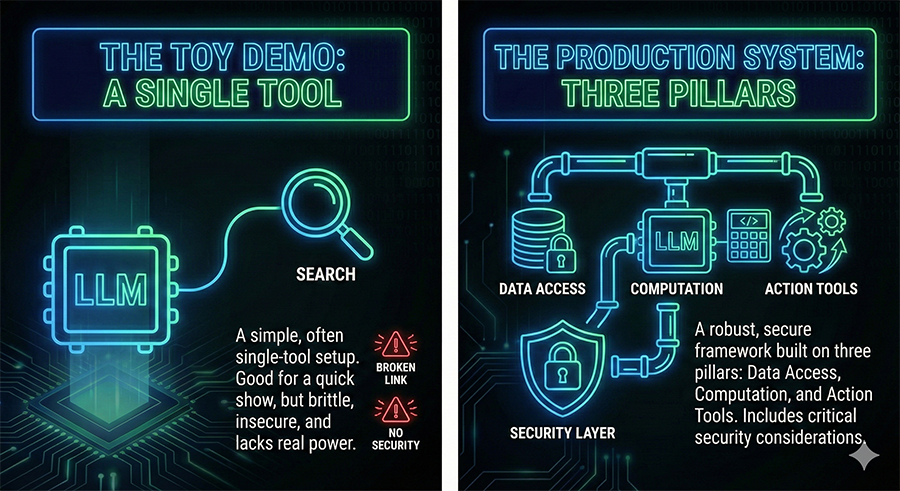
Organizing tools into three categories creates a useful mental model for thinking about capability and risk:
1. Data Access Tools
Read-only tools that retrieve information. These let the LLM access current data that wasn’t in its training set.
Examples:
- Vector database queries for semantic search
- SQL queries against your application database
- NoSQL document retrieval
- API calls that fetch data
- File system reads
Risk profile: Low to moderate. These tools can leak sensitive information but can’t directly modify state. The main concerns are unauthorized data access and exfiltration.
Design principle: Implement the minimum necessary access. If a tool only needs to read one table, don’t give it access to the whole database. Query results should be filtered and limited before reaching the LLM.
2. Computation Tools
Tools that process and transform data. These extend the LLM’s capabilities beyond text generation.
Examples:
- Code execution environments
- Mathematical computation
- Data transformation and analysis
- Format conversion
- Validation and parsing
Risk profile: Moderate. Computation tools can be exploited for resource exhaustion (infinite loops, memory bombs) or used as stepping stones to other attacks. Sandboxing is essential.
Design principle: Computation should happen in isolated environments with resource limits. Set timeouts, memory caps, and network restrictions. Assume any code the LLM generates could be malicious.
3. Action Tools
Tools that change state in the real world. These are where the LLM becomes an agent that does things.
Examples:
- Database writes and updates
- API calls that modify state
- File system writes
- Email and notification sending
- Payment processing
- External service integrations
Risk profile: High. Action tools can cause real damage. A hallucination that leads to a database deletion isn’t theoretical; it’s a data loss incident with potential legal and financial consequences.
Design principle: Every action tool should have guardrails proportional to its blast radius. More on this below.
The Security Model You Actually Need
Most tutorials treat security as an afterthought. In production, security is the architecture.
Principle of Least Privilege
Each tool should have exactly the permissions it needs and nothing more. If your email tool only needs to send notifications to verified addresses, it shouldn’t be able to email arbitrary recipients. If your database tool needs to read customer records, it shouldn’t have write access.
This sounds obvious. In practice, it’s tedious to implement and teams cut corners. Don’t. The corners you cut become the attack surface.
Input Validation
Everything that goes into a tool should be validated. The LLM’s output becomes your tool’s input, and LLM outputs are untrustworthy. They can be manipulated through prompt injection, jailbreaking, or simple hallucination.
Validate types, ranges, and formats. Reject inputs that don’t match expected patterns. Never trust that the LLM will follow your instructions about output format.
Output Sanitization
Tool outputs going back to the LLM also need attention. If a database query returns user-generated content, that content could contain text designed to manipulate the LLM’s subsequent behavior. Sanitize outputs before including them in context.
Rate Limiting
LLMs can call tools in loops. Without rate limits, a misbehaving agent can overwhelm your systems with requests. Implement both per-tool and aggregate rate limits. Set them conservatively and adjust based on actual usage patterns.
Human-in-the-Loop: Not Optional for High-Risk Actions
Some tool invocations should require human approval before execution. The threshold depends on your risk tolerance, but common triggers include:
- Financial transactions above a certain amount
- Data modifications affecting critical records
- External communications to parties outside your organization
- Irreversible actions of any kind
- Actions on sensitive data covered by regulations
The implementation pattern looks like this:
- LLM proposes an action
- System checks if action requires approval
- If yes, queue the action and notify a human reviewer
- Human approves, modifies, or rejects
- System executes the approved action (or doesn’t)
This adds latency. That’s the point. Some actions shouldn’t happen instantly. The friction is a feature.
Error Handling That Doesn’t Break Everything
Tools fail. Networks time out. APIs return errors. Databases go down. Your LLM agent needs to handle these cases gracefully.
Retry with backoff: Transient failures should be retried automatically with exponential backoff. Don’t let a single network blip crash your agent.
Graceful degradation: When a tool is unavailable, the agent should acknowledge the limitation rather than hallucinating a response. “I can’t access the database right now” is better than making up data.
Error context: When tools fail, provide enough context for the LLM to reason about the failure. “Database query timed out after 30 seconds” is more useful than “Error occurred.”
Circuit breakers: If a tool fails repeatedly, stop calling it for a cooldown period. This prevents cascading failures and gives systems time to recover.
Production Monitoring
You need visibility into what your agent is doing. Without monitoring, you’re running blind.
Log every tool invocation. Inputs, outputs, timing, success/failure. You’ll need this for debugging, auditing, and understanding agent behavior.
Track token usage. Tool calls consume tokens. Long tool outputs eat context. Monitor usage to catch runaway costs and context overflow.
Alert on anomalies. Sudden spikes in tool usage, unusual action patterns, or elevated error rates should trigger alerts. Something has changed; you want to know what.
Maintain audit trails. For action tools especially, keep immutable records of what was done, when, and based on what reasoning. This is essential for debugging, compliance, and incident response.
Putting It Together: A Reference Architecture
Here’s how the pieces fit:
User Input
    |
    v
+-------------------+
|   LLM Reasoning   |
+-------------------+
    |
    v
+-------------------+
| Tool Selection    |
| & Parameter Gen   |
+-------------------+
    |
    v
+-------------------+
| Input Validation  |
| & Sanitization    |
+-------------------+
    |
    v
+-------------------+
| Permission Check  |
| & Rate Limiting   |
+-------------------+
    |
    v
+-------------------+
| HITL Check        |<--- Approval Queue
| (if required)     |
+-------------------+
    |
    v
+-------------------+
| Tool Execution    |
| (sandboxed)       |
+-------------------+
    |
    v
+-------------------+
| Output Sanitize   |
| & Logging         |
+-------------------+
    |
    v
+-------------------+
|   LLM Reasoning   |
|   (with result)   |
+-------------------+
Every layer matters. Skip one and you’ve created a vulnerability.
The Demo-to-Production Gap
The gap between a working demo and a production system isn’t about the happy path. It’s about everything else.
A demo shows: “Look, the LLM called a tool and got the right answer!”
Production requires: “What happens when the tool fails? What happens when the LLM hallucinates a tool call? What happens when a user tries to manipulate the LLM into calling tools it shouldn’t? What happens when our database connection pool is exhausted? What happens when the API we depend on changes its response format?”
Demos impress stakeholders. Production systems handle reality. The three pillars framework gives you a structure for thinking about tools. The operational considerations, security, HITL, error handling, monitoring, are what make that structure actually work.
Editor’s Take
Tool calling is where LLMs become useful and dangerous in equal measure. The same capability that lets your AI assistant query databases and send emails also lets it query databases and send emails in ways you didn’t intend.
The tutorial ecosystem does developers a disservice by focusing on capability while glossing over safety. Yes, you can connect an LLM to your database in an afternoon. Whether you should, and how you should, requires more thought than most tutorials provide.
The three pillars framework is useful because it forces you to categorize tools by their risk profile. Data access tools need different guardrails than action tools. Treating them identically invites problems.
If you take one thing from this piece, let it be this: the architecture around your tools matters more than the tools themselves. A well-sandboxed, properly validated, monitored tool setup with mediocre tools will outperform a sophisticated toolkit with no operational discipline.
Build the boring parts first. The guardrails, the logging, the validation. Then add the exciting tools. Your future self, investigating an incident at 2 AM, will thank you.